Blog
How to Integrate Leads Into a CRM While Protecting Data
Learn how to integrate leads into a CRM with clear field mapping, deduplication, routing, testing, and security rules that protect data and improve follow-up.

A CRM connection can move leads faster, but it can spread bad data just as quickly. Knowing how to integrate leads into a CRM means connecting each capture source, mapping fields, and setting rules for matching, routing, and access. The goal is a reliable record that reaches the right team without exposing unnecessary information.
That balance matters. A smooth sync isn’t automatically a safe one: duplicate records, conflicting field updates, weak permissions, or untested automation can turn a useful workflow into a data-quality and security problem. Integration should protect information while making it actionable.
This guide explains what CRM integration means and how native connections, APIs, and connector platforms move lead data. It covers field ownership, duplicate matching, testing, security, and team adoption, including where automation helps and where human review still matters. A connected workflow can support faster, more consistent follow-up without treating every incoming record as trustworthy by default.
Key Takeaways
- Set clear field ownership and matching rules to reduce duplicate records and prevent automation from overwriting useful data.
- Connect lead sources to shared CRM records to improve visibility, coordination, and data accuracy across teams.
- Use routing and activity history to help sales teams prioritize leads and follow up with relevant context.
- Protect lead information with controlled access, careful testing, and training that helps users follow the workflow consistently.
Data duplication, automation risks, security, and user training
Reliable integrations need clear matching rules, controlled access, and automation that moves lead data without multiplying errors. A clean CRM record should preserve its source and history, not just arrive quickly.
Integration cost depends on the connection method, field mapping, and ongoing support required. Native CRM connections, APIs, and connector platforms differ in setup needs and control. Compare them against your systems, data flows, and oversight requirements.
Duplicate Data and Security Risks
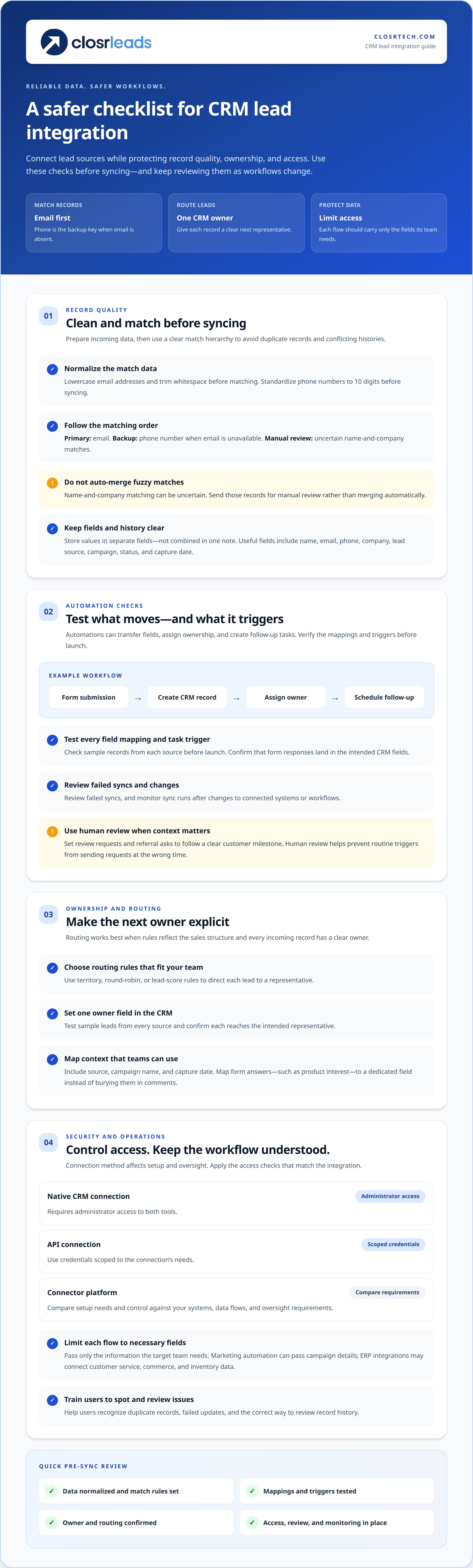
Duplicate data occurs when an integration creates another CRM record for a lead already stored there. Security risks arise when data or access is mishandled. Before syncing, lowercase email addresses and trim whitespace, then use email as the primary match key. If no email is available, use a phone number as a secondary key. Reserve name-and-company fuzzy matches for manual review, not automatic merges. These steps help protect CRM data from mistaken merges and conflicting histories.
Automated Lead Updates and Follow-Ups
Automated updates transfer lead fields between systems, while follow-up rules create replies or tasks based on defined events. A new form submission can create a CRM record, assign an owner, and schedule follow-up automatically. Before launch, test every field mapping and task trigger, then review failed syncs. Set automated review requests and referral asks to follow a clear customer milestone, with human review when context matters. This prevents routine triggers from sending untimely requests.
Assign and route leads with rules that match your sales structure. Territory, round-robin, or lead-score rules can direct each record to the right representative. Set one owner field in the CRM, then test sample leads from every source to confirm they reach the intended representative.
For security, native integrations require administrator access to both tools; API connections need scoped credentials. Train users to recognize duplicate records, failed updates, and the correct way to review record history. Marketing automation can pass campaign details, while ERP integrations may connect customer service, commerce, and inventory data. Limit each flow to the fields its target team needs, and monitor sync runs after changes.
Efficiency, ROI, data accuracy, and team collaboration
Connected applications reduce manual copying and give teams a shared view of customer data. The payoff depends on clean records, useful field mappings, and workflows people actually use.
Customer Data Integration Practices
Customer data integration brings records from separate software into a consistent, usable view. It matters because disconnected applications leave teams acting on partial information. The average business has integrated only 28% of its applications, and 81% of IT leaders say data silos impede digital transformation. Set shared field names and ownership rules across marketing, sales, and customer service. A connected lead workflow can help teams act on the same customer context.
CRM Data Storage and Organization
A CRM organizes customer data into records, fields, and related activity history. A clear structure makes accurate reporting and handoffs easier. Use fields for full name, email, phone, company, lead source, campaign, status, and capture date. Store each value in its own field rather than combining source and campaign in one note. Standardize phone numbers to 10 digits before syncing, so searches and reports use a consistent format.
Capturing Lead Data from Forms
Lead-generation forms capture prospect details and context at the point of interest. Map each form response to a matching CRM field, including source, campaign name, and capture date. For businesses driving traffic through organic search and paid campaigns, agencies like SEO Guru Houston often structure landing page forms and tracking parameters so marketing data passes cleanly into CRM pipelines. For example, map a social media form’s product-interest response to a dedicated field instead of burying it in comments. Keep required fields focused on information sales will use. This reduces incomplete records without adding unnecessary friction for people submitting the form.
Integration Steps and Data Cleanup
Integration connects a lead source to the CRM through mapped fields, transfer rules, and checks. Define the business need, inventory source applications, map fields, choose a connection method, test sample records, and monitor sync results. To clean and deduplicate data, normalize email addresses, trim spaces, validate required fields, and compare records before import. Use email as the primary match key and phone when email is absent. Send uncertain name-and-company matches for manual review rather than merging them automatically. These steps improve accuracy and give teams dependable information for follow-up.
Benefits of connecting lead tools to a CRM
Connecting lead tools to a CRM gives teams a shared view of where prospects came from and what they did. Form submissions, campaign responses, and sales conversations can sit together, helping employees interpret behavior instead of piecing together separate records. Knowing how to integrate leads into a CRM means connecting those activities to support useful next steps.
For sales, source context can shape the first conversation. A representative who sees that a prospect requested information through a specific campaign can tailor the opening to that interest. CRM routing can also assign leads by territory or round-robin, giving each incoming record a clear next owner instead of leaving it in an inbox.
Customer service benefits when a handoff includes the lead’s prior interactions. If a prospect asks about a product, then contacts support with a related question, staff can see the earlier request and respond with relevant context. This continuity helps teams avoid asking customers to repeat information and connects service conversations to sales activity.
A more complete customer experience comes from coordinated actions. When a new product launches, for example, marketing can identify relevant audiences, sales can follow up with interested prospects, and customer service can answer product questions. Connected records help each team work from consistent information instead of separate assumptions.
Integration can streamline work across sales, marketing, and service by reducing manual transfers and clarifying which team acts next. Providers like Marketing System Solutions focus on structuring these lead management systems so incoming data supports practical daily operations. A lead’s campaign source can inform outreach, while the CRM’s owner and status help prevent competing follow-ups. For teams deciding how to integrate leads into a CRM, the key benefit is a coherent interaction, not just faster data transfer.
To assess ROI, compare the workflow before and after integration. Track time spent moving records, lead-response activity, progression through sales stages, and completed handoffs. If staff previously copied form details into the CRM, for example, measure whether that task decreases and whether fewer prospects lose context between marketing and sales. These indicators show whether integration supports business outcomes, not just technical connectivity.
CRM integration security and compliance
CRM integration security protects lead information as platforms transfer, store, and update records. Treat every connection as a distinct data flow: identify the source, destination, fields exchanged, and people with access. For a campaign form sending contact details to a CRM, document which fields move and why. This map helps teams spot unnecessary exposure before workflows go live.
Match access to the task. Limit setup access to people who need it, and grant each connection only the permissions its workflow requires. API connections need scoped credentials, a developer or integration partner, and a documented field schema for both systems. Grant each connection only the permissions its workflow requires. A lead-generation connector that creates records shouldn’t automatically be able to change unrelated account data.
Compliance planning starts with your organization’s obligations and the data each integration handles. Map how lead information is collected, transferred, used, and retained. Align field collection and access with the requirements relevant to your business and location. For example, if a form captures campaign details and contact information, define which team uses each field and prevent unrelated workflows from receiving it. Don’t treat one platform’s settings as proof that every connected system is compliant.
Security requires ongoing oversight, not a one-time setup. Test sample records before launch, review sync runs, and investigate failed or unexpected updates. Assign an owner to monitor connector activity and coordinate fixes when a field mapping changes. Keep a record of integration changes, affected workflows, and steps taken to restore accurate data. This history helps teams explain how information moved and protect customer relationships when a process needs adjustment.
ClosrLeads
ClosrLeads supports CRM workflows with real-time and aged insurance leads across five verticals: Veteran Final Expense, Trucker & CDL, Mortgage Protection, IUL, and Premium Volume Leads. Fresh leads are delivered in real time, and aged leads are available in shelves. The built-in dialer sends leads directly into your CRM via webhook or CSV for follow-up.
Consider ClosrLeads when your team needs insurance leads that fit an established CRM process. Every fresh lead is OTP phone-verified, with TCPA-compliant capture and consent records. Invalid contacts, including disconnected, wrong-number, or otherwise invalid contacts, are credited or replaced per policy. Your CRM’s field mapping, access controls, and follow-up rules still determine how each record is managed after delivery. Contact ClosrLeads to connect your lead workflow.
Make your next lead workflow count
The strongest CRM setup isn’t a one-time project. Treat it as a working process: review whether lead sources still map cleanly, whether teams use records consistently, and whether updates support the next customer interaction. That keeps the system useful as sales priorities change.
Knowing how to integrate leads into a CRM gives you a foundation for better follow-up, but the leads entering that workflow matter too. ClosrLeads offers Final Expense Leads, Veteran Insurance Leads, and IUL Leads to support insurance sales teams building their pipelines. Match the lead type to your target market, then connect incoming records to the CRM process your representatives already use.
Ready to discuss how lead delivery can fit your workflow? Contact ClosrLeads to discuss CRM integration. Keep refining the process, and make every new lead easier for your team to act on.
Frequently Asked Questions
What is CRM integration?
CRM integration connects a customer relationship management system with other business tools so relevant information can move between them. For example, a website form can create a prospect record, while a calendar tool can add a scheduled meeting to it. The practical result is connected activity and fewer disconnected handoffs, provided the systems share compatible fields and clear update rules.
How does CRM integration save my business time and money?
Integration can reduce the time staff spend copying lead details, searching across applications, and fixing inconsistent records. Assess its value by tracking those tasks before and after launch, alongside follow-up completion and record corrections. Savings depend on the workflow, setup, and ongoing maintenance. The clearest case is a repetitive transfer that consumes staff time or delays action.
What are the biggest challenges or risks of CRM integration?
The main risks include duplicate records, mismatched fields, excessive access, and automations that send incorrect updates or messages. A changed form field, for example, could place a prospect’s answer in the wrong CRM field. Mitigate these risks by testing sample records, limiting permissions, assigning an integration-monitoring owner, and defining how to pause a faulty workflow while correcting errors.
Why is CRM integration important?
Integration matters because teams need useful context to coordinate customer interactions. If marketing records a campaign response but sales can’t see it, the next conversation may miss the prospect’s stated interest. A shared record helps teams act on the same information, assign responsibility, and understand prior engagement. The value comes from better-coordinated work, not connecting software for its own sake.
How do you capture leads from websites, forms, email, and social media in a CRM?
Connect each source through a native integration, an API, or a connector platform, then map its fields to the matching CRM fields. Website and campaign forms can pass contact details and submission context. Email tools can sync relevant inquiry information, while social media lead forms can transfer submitted responses. Test a sample from every source to confirm records arrive with useful context.
Which CRM integrations and lead automation tools are available?
Common options include native connections built into the CRM or lead platform, API integrations, and connector or iPaaS services that link separate applications. Automation can create records, assign owners, update statuses, and schedule follow-up tasks. The right option depends on the systems involved, data flow, permissions, and maintenance capacity. For insurance lead delivery, ClosrLeads’ built-in dialer sends leads directly into your CRM via webhook or CSV.