Blog
Leads delivered to CRM: How to route, map, and fix delivery
Learn how to route, map, and troubleshoot leads delivered to CRM systems. Ensure fast, accurate data flow to reps and prevent costly handoff failures today.

Leads delivered to CRM systems become actionable when they reach the right buyer with accurate, complete information. Set routing and field-mapping rules before launch, then test the full path from lead capture to CRM record. This helps catch misrouted leads, missing fields, and failed handoffs before they delay follow-up.
Fast delivery matters, but speed alone won’t fix a lead sent to the wrong representative or saved with incomplete data. You need a clear process that matches each lead to the right buyer, carries its details into the correct CRM fields, and makes delivery failures visible. This guide walks through buyer-specific routing, field mapping, integration options such as APIs and webhooks, and practical troubleshooting steps. You’ll come away with a sharper way to build and check a lead flow, so your sales team can act on complete, correctly assigned records instead of chasing preventable errors.
Key Takeaways
- Set routing rules around buyer fit, territory, skills, or lead priority, then map each incoming value to the correct CRM field.
- Choose an integration method based on how the source sends data and how your CRM receives it; test the full handoff before launch.
- When delivery breaks, trace the lead from capture to CRM and inspect connection status, field formats, required values, and error logs.
- Compare delivery costs by the integration work, software, and ongoing support involved, not just the initial setup.
- Use a built-in dialer alongside insurance leads when a direct path from lead delivery to follow-up fits your sales workflow.
1. Buyer-specific routing and field mapping
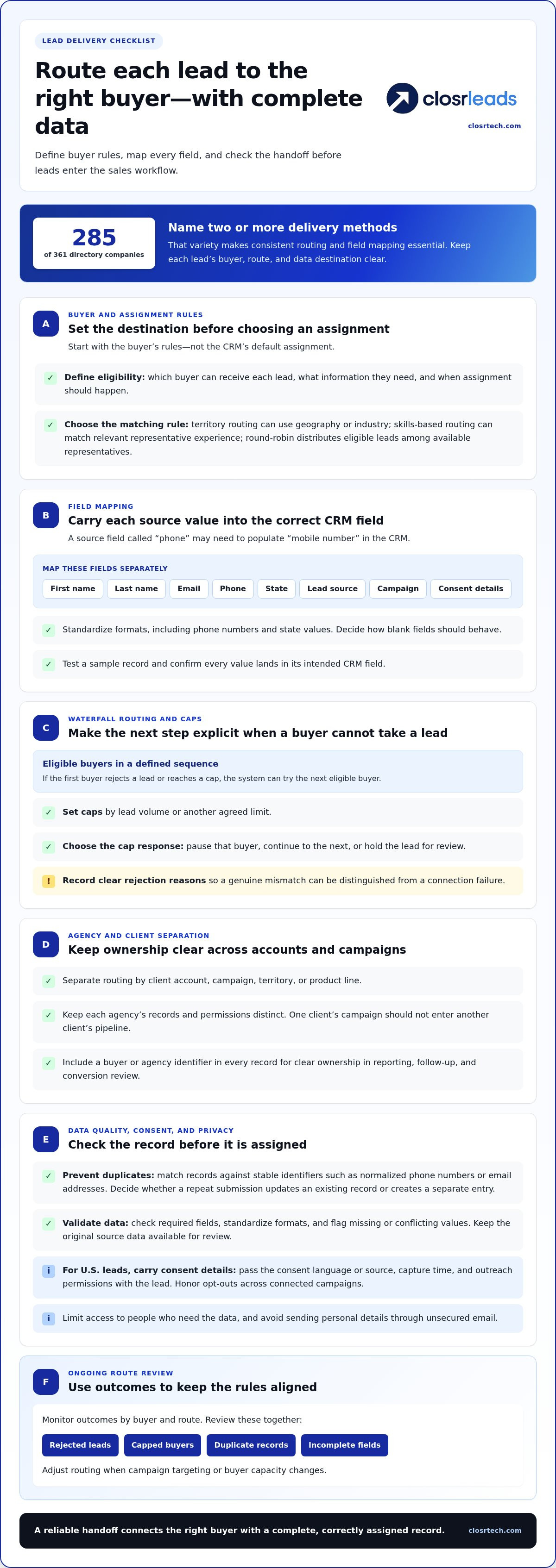
Start with the buyer’s rules, not the CRM’s default assignment. For leads delivered to a CRM, define which buyer can receive each lead, what information they need, and when assignment should happen. Territory-based routing can use geography or industry. Skills-based routing can match leads with representatives who have relevant experience. Round-robin assignment distributes eligible leads among available representatives.
Next, map each source field to its destination field. A source value labeled “phone” might need to populate “mobile number” in the CRM. Map first name, last name, email, phone, state, lead source, campaign, and consent details separately. Standardize formats, including phone numbers and state values, and decide how blank fields should behave. Test a sample record and confirm each value lands in the correct field.
Waterfall routing sends a lead to eligible buyers in a defined sequence. If the first buyer rejects it or reaches a cap, the system can try the next eligible buyer. Set caps by lead volume or another agreed limit, then define what happens when a cap is reached: pause that buyer, continue to the next, or hold the lead for review. Clear rejection reasons help distinguish a genuine mismatch from a connection failure.
For agency clients, separate routing by client account, campaign, territory, or product line, and keep each agency’s records and permissions distinct. A lead for one client’s campaign, for example, should not enter another client’s pipeline. Include a buyer or agency identifier in every record to make ownership clear during reporting, follow-up, and conversion review.
In the United States, treat consent and privacy details as part of the lead record. Pass the consent language or source, capture time, and outreach permissions with the lead, and honor opt-outs across connected campaigns. Limit access to people who need the data, and avoid sending personal details through unsecured email.
Prevent duplicates by matching records against stable identifiers, such as normalized phone numbers or email addresses. Decide whether a repeat submission updates an existing record or creates a separate entry. Improve data quality by checking required fields, standardizing formats, and flagging missing or conflicting values before assignment. Keep the original source data available for review.
Finally, monitor outcomes by buyer and route. Among 361 directory companies that describe delivery, 285 name two or more delivery methods. That variety makes consistent routing and field mapping essential. Review rejected leads, capped buyers, duplicate records, and incomplete fields together. Adjust rules when campaign targeting or buyer capacity changes.
2. API, webhook, and direct post integrations
An API lets two software platforms exchange lead data through defined requests. A webhook sends an event when something happens, such as a new prospect submission. Direct post sends lead details from the source to a receiving endpoint. Among 361 directory companies describing delivery, 112 name API, webhook, or direct post delivery. These approaches connect inbound sources with a CRM without relying on manual entry.
Choose a delivery method supported by both the source and the CRM. An API can suit workflows that need structured requests and responses. A webhook can trigger an action as soon as a source records a new lead. Direct post can send submitted details to a configured destination. Before sending live traffic, agree on the required fields, authentication method, and expected response.
Build the connection in stages. Document the source’s field names and formats, then match them to the CRM’s required fields. Configure authentication and the receiving endpoint. Send a test prospect with representative values, including optional fields and unusual characters. Confirm the record appears once with its source and campaign information intact. Only then route live leads to the sales team.
Webhook and API failures need a clear recovery path. Log each request’s timestamp, response status, and lead identifier. If the receiving platform rejects a record, retain the error and retry only after correcting its cause. Use a unique submission identifier so a retry doesn’t create a duplicate. Record a clear acknowledgment of successful delivery, allowing sales teams to distinguish a completed handoff from a silent failure.
How quickly are leads delivered to a CRM? Timing depends on the source, connection, and receiving platform. Among 347 companies reporting delivery speed, most describe real-time delivery. A real-time setup can pass a lead as the source captures it, while email or file-based steps can add delays.
Test timing at each handoff, not just at the CRM. Record when the source captures a lead and when the CRM creates its record, then compare the timestamps across test submissions. If the delay occurs before the request reaches the endpoint, inspect the source process. If the CRM receives the request but creates no record, check validation errors and required fields.
Networks and exchanges use these methods too. Among 124 networks, exchanges, or marketplaces, 43 describe API or webhook posting, while 19 name ping post. For an insurance sales workflow, apply the same handoff checks when reviewing insurance lead delivery. Strong connections make the source, buyer, and CRM status visible to the team.
3. Troubleshooting delivery failures
When a lead fails to appear, trace its path from capture to the CRM record. Compare the source’s submission log with the integration log and the CRM’s activity history. If the lead is missing from the source log, investigate capture. If the submission is logged but no CRM record exists, investigate the connection, validation, or assignment step.
Check the response status and error message for each failed request. An authentication error points to credentials or access permissions. A rejected field may mean the source sends a format the CRM doesn’t accept, such as text in a date field. Correct the specific cause, then send a controlled test record before resuming live lead delivery.
For delayed records, compare the source timestamp, integration timestamp, and CRM creation time. This sequence shows where processing slowed. Check whether a queue is building, a scheduled sync is waiting, or the CRM is limiting incoming requests. Review retry settings as well. Repeated retries without a unique lead identifier can create duplicates instead of restoring delivery.
For inaccurate records, compare the field mapping with the source data. A “state” value might be mapped to a notes field, or a phone number might lose its country code during formatting. Confirm required fields, accepted formats, and assignment rules in the lead management system. Then test one record with a blank optional field and another with complete details.
Delayed, missing, or inaccurate delivery can prevent timely outreach, misdirect follow-up, and distort pipeline insights. Incorrect records can also weaken engagement tracking, making campaign results harder to interpret—particularly in targeted B2B strategies like the account-based marketing campaigns discussed at arokiaitusa.com, where precise prospect tracking directly shapes performance.
Automate alerts for failed submissions, rejected records, and growing queues. Include the lead identifier, source, timestamp, and error details in each alert. Send alerts to the person responsible for integration support, not only to the sales representative. A structured failure log helps distinguish a single malformed record from a wider connection outage.
After restoring delivery, reconcile source and CRM records for the affected period. Match them using a stable identifier, then flag leads that are missing, duplicated, or incomplete. Record the cause and corrective action beside each issue. This makes later reviews faster and helps teams spot recurring problems across inbound sources.
Run a fresh end-to-end test after any change to mapping, credentials, or routing. Submit a test lead, confirm its CRM record, and verify its owner and campaign source. Check that a failure triggers the expected alert. This closes the loop between capture, integration, and customer relationship management.
4. Which CRM systems integrate with lead delivery services?
Lead delivery services can connect with CRMs, dialers, and lead management systems that accept incoming records. Among 361 directory companies describing delivery, 210 name a CRM, dialer, or lead management system as a delivery method. The deciding factor is the receiving system’s integration capability, not its label. It must accept lead details through a supported connection or structured import.
Check the system’s available connection methods first. An API, webhook, or direct post can send records to a compatible endpoint. Some platforms also accept leads through an integration tool, email parsing, or file import. Match the delivery method to the CRM’s actual input options. If it cannot receive the source’s format, a connector or transformation step may be needed.
Inspect the CRM’s record structure next. Identify its required fields, supported data types, and rules for creating or updating contacts. For example, a CRM may require a last name and lead source before saving a new record. The delivery connection must supply those values or apply an approved default. Confirm how the CRM handles existing contacts, owner assignment, and campaign attribution.
A practical compatibility test has three stages. Send a test record with representative details, then confirm the CRM creates the correct record and assigns it to the intended queue or representative. Inspect the activity history for the source, timestamp, and integration status. Repeat with a duplicate and a missing optional field to see how the system handles exceptions.
Separate CRM compatibility from workflow fit. A platform may receive records successfully but still lack the fields or automation your sales process needs. Check whether it can route by territory, product, buyer, or campaign. Confirm assigned users can see the record and that follow-up tasks or dialer actions use the correct contact details.
If your team uses more than one platform, map the full path before launch. A lead might move from a source to an integration layer, then into a CRM and dialer. Each handoff needs a matching identifier and a clear success response. Without those controls, a record may appear in one system but remain missing from another.
Use a short acceptance checklist before routing live leads:
- Receiving method: Confirm the CRM accepts the source’s API, webhook, direct post, or import format.
- Field rules: Match required fields, formats, and ownership values.
- Record behavior: Test new records, duplicates, and rejected submissions.
- Visibility: Confirm the sales team can access assigned leads and their source details.
Document the tested connection and its field map. If the CRM, dialer, or lead source changes, repeat the same acceptance checks before relying on the updated workflow.
5. How much does CRM lead delivery software or integration cost?
There isn’t one standard cost for connecting lead delivery software to a CRM. The price depends on the case and is given after a quote request; cost factors include the systems involved, the connection method, field mapping, and the amount of testing required. A direct connection between compatible platforms may need less setup than a workflow with several sources, custom fields, and separate buyer routes.
Separate software charges from implementation work. A platform subscription may cover access to its connection tools, while setup can involve configuring credentials, endpoints, and data rules. Ongoing support may also affect the total. Compare each component separately so a low initial setup estimate doesn’t obscure recurring software or maintenance charges.
The integration method affects the work involved. An existing API or webhook can use a supported endpoint, while a source that sends spreadsheets may need an import workflow. Mapping standard name and phone fields differs from transforming campaign codes, validating consent details, and assigning records across buyer accounts. List those requirements before comparing proposals.
Lead volume and workflow complexity also shape the effort. A single source sending records to one CRM queue involves fewer handoffs than multiple sources feeding separate teams. If each buyer needs different fields or routing rules, the setup must account for those variations. Ask for the work to be broken down by task, such as source connection, field mapping, testing, and error handling.
Use a practical comparison checklist:
- Software: Identify the platform access and features included in the recurring charge.
- Setup: List each source, destination, field map, and routing rule involved.
- Maintenance: Clarify how updates to a CRM or lead source affect ongoing support.
- Testing: Include test records, duplicate handling, and failure alerts in the scope.
Estimate the value of the workflow, not just its invoice. If manual entry takes staff away from outreach, compare that effort with the time needed to manage an automated connection. Include the work of fixing missed records, correcting bad field mappings, and reconciling duplicate contacts. These operational tasks can make an option that looks inexpensive more demanding to run.
Before approving a quote, request a written scope that names the systems, delivery method, fields, routing rules, and support responsibilities. Confirm how changes are handled if the CRM adds a required field or a source changes its data format. A clear scope makes proposals easier to compare and sets a concrete acceptance test: each lead arrives once, with correct data, at the intended destination.
ClosrLeads: Final Expense Leads
ClosrLeads connects insurance lead delivery with follow-up through its built-in dialer, which delivers leads directly into your CRM. If your routing and field mapping are ready, this can help move incoming prospects into your sales workflow without manual entry. Leads are delivered through a CRM webhook or CSV, your choice.
Choose from Veteran Final Expense, Trucker & CDL, Mortgage Protection, IUL, and Premium Volume Leads based on your target market. All leads are OTP-verified and TCPA-compliant, with documented consent records. ClosrLeads offers both real-time and aged leads, while the built-in dialer supports follow-up. Invalid contacts are covered by a replacement guarantee under ClosrTech policy.
Explore ClosrLeads’ insurance leads and built-in dialer for your CRM workflow. Contact ClosrLeads to get started.
Build a Lead Flow That Can Keep Improving
Make delivery part of your sales operating rhythm, not a one-time technical setup. Assign an owner to monitor changes in lead sources, buyer requirements, and CRM workflows. When something changes, review whether the process still sends the right information to the right team. This habit helps keep leads delivered to CRM aligned with how your sales team works.
Use representatives’ feedback to guide improvements. If they repeatedly correct the same field or reassign the same type of prospect, treat the pattern as a signal to refine the workflow. Small, deliberate adjustments can clarify the handoff and give your team more time for meaningful conversations.
For an insurance lead source that fits your sales process, take the next step with ClosrLeads. Contact ClosrLeads to discuss lead delivery and explore a workflow that supports your team. Keep refining the process, and make every handoff count.
Frequently Asked Questions
What does it mean to deliver leads to a CRM?
It means transferring a prospect’s information into a customer relationship management record that a sales team can work. When leads are delivered to a CRM, the record can include contact details, the originating campaign, and a follow-up status. For example, someone who submits a mortgage inquiry can appear as a new contact rather than remaining only in the form platform. The CRM then becomes the working record for that opportunity.
How are leads delivered to a CRM from lead generation platforms?
A lead generation platform captures a prospect’s submission, packages the details, and sends them to the destination selected for that campaign. The receiving CRM can create a new contact or update an existing one, depending on its rules. For example, a form platform may pass along the campaign name, so a representative can see which promotion brought in the prospect before beginning follow-up.
What lead delivery methods are available: API, webhook, email, or CSV?
Common options include API, webhook, email, and CSV file delivery. An API supports structured system-to-system exchanges, while a webhook can trigger a transfer when a new submission occurs. Email can work when a source sends a consistent notification that another process can read. CSV is useful for batch uploads, such as importing a prepared contact file. The right choice depends on delivery frequency and the receiving platform’s accepted inputs.
How can you verify leads are being delivered and assigned correctly?
Submit a test inquiry with a distinct name and campaign label, then find that exact record in the CRM. Confirm its assigned owner, source attribution, and status. For ongoing checks, compare the source’s submission history with CRM records from the same period. A small reconciliation report can reveal missing entries or unassigned contacts. Review records after changing a campaign or user-assignment rule.
What steps are needed to connect a lead source to a CRM?
First, identify the source, destination, and receiving method supported by both systems. Review the CRM’s required fields and decide which source values belong in each one. Configure access credentials and destination settings, then send test submissions that represent common cases. Confirm records appear with the correct ownership and campaign details. Before launch, document who monitors errors and how the team pauses delivery if the CRM is unavailable.