Blog
Set Up an Insurance Dialer for Outbound Calling
Learn how to set up an insurance dialer with compliant dialing modes, local-time scheduling, CRM follow-up, and caller ID safeguards to improve outreach cont...

Fast dialing is not the goal. Controlled, compliant follow-up is. To understand how to set up an insurance dialer, choose a dialing mode that fits your team, organize leads for follow-up, connect call outcomes to your CRM, and schedule calls within permitted hours. According to the Federal Trade Commission, telemarketing calls are generally allowed between 8 a.m. and 9 p.m. in the called person’s time zone. The FTC also caps abandoned calls at 3% of answered calls per campaign, measured over 30 days.
More calls won’t help if the wrong settings lead to missed connections or poorly timed attempts. A well-configured insurance dialer gives agents a clear workflow and keeps campaign controls in view. This guide covers preview, progressive, power, and predictive dialing; local-time scheduling and compliance safeguards; caller ID; and automation for fresh and aged leads. You’ll learn how to match the dialer to your team, reduce manual steps, and run campaigns efficiently without losing control.
Key Takeaways
- Match the dialing mode to your team’s size and workflow, then balance call pace with controls that limit abandoned calls.
- Schedule campaigns around each prospect’s local time, and build Do Not Call screening and consent records into the process.
- Protect caller ID reputation with agency-owned numbers that can receive callbacks, and use number rotation thoughtfully.
- Automate follow-up and call outcome logging to reduce manual work; ClosrLeads’ Built-In Dialer delivers insurance leads into your CRM for follow-up.
Preview, progressive, power, and predictive dialing modes
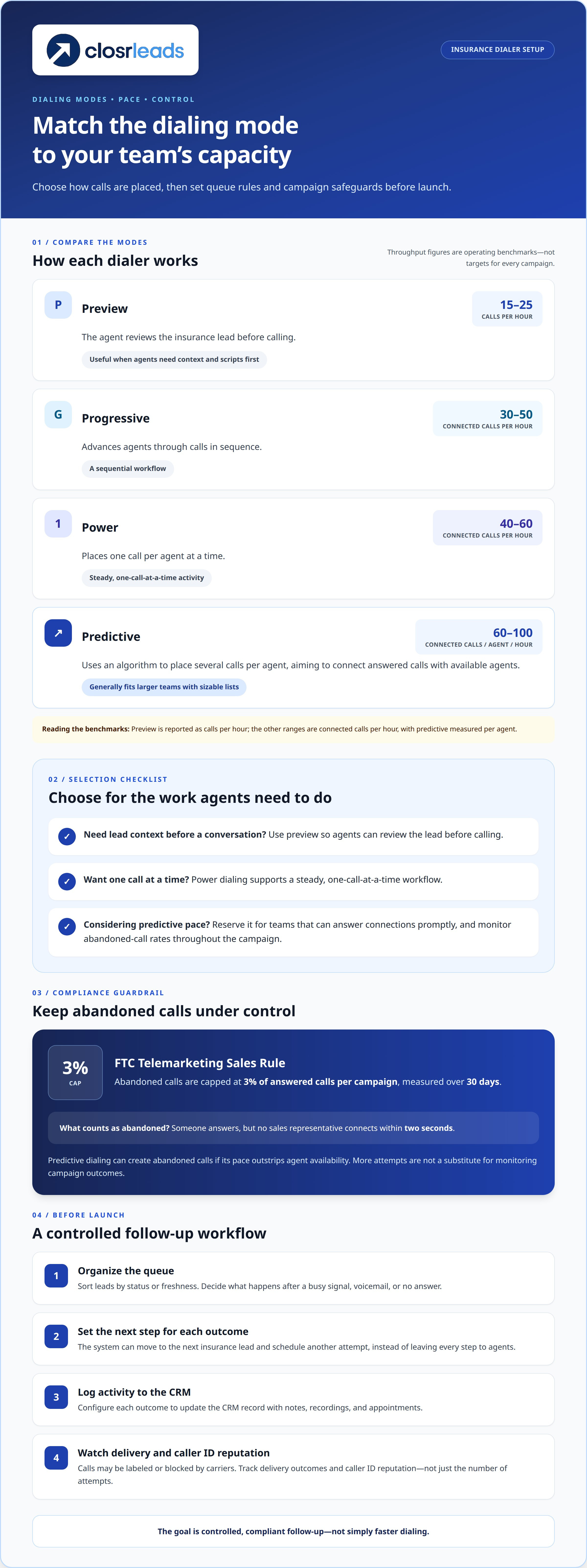
Start by matching the dialing mode to agent capacity and the information agents need for each call. A preview dialer lets an agent review an insurance lead before calling, which can support a more prepared conversation. A power dialer places one call per agent at a time. A predictive dialer uses an algorithm to place several calls per agent, aiming to connect answered calls with available agents. Progressive dialing advances agents through calls in sequence.
Throughput varies by mode. A preview workflow is described as supporting 15-25 calls per hour, while progressive dialing is described as supporting 30-50 connected calls per hour. A power dialer can produce 40-60 connected calls per hour in the described insurance workflow. Predictive dialing is described as supporting 60-100 connected calls per agent per hour, and generally fits larger teams with sizable lists. These figures are operating benchmarks, not targets for every campaign.
Speed carries risk. According to the Federal Trade Commission, the Telemarketing Sales Rule caps abandoned calls at 3% of answered calls per campaign, measured over 30 days. Under the same rule, a call is abandoned when someone answers and no sales representative connects within two seconds. Predictive dialing can create abandoned calls if its pace outstrips agent availability. Calls may also be labeled or blocked by carriers, so track delivery outcomes and caller ID reputation rather than simply increasing attempts.
Set queue rules before launching. Sort leads by status or freshness, then decide how the system handles a busy signal, voicemail, or no answer. For example, it can move to the next insurance lead and schedule another attempt, rather than leaving agents to manage every step manually. Configure each outcome to update the CRM record with notes, recordings, and appointments. Use preview dialing when agents need context and scripts before a call; choose power dialing for steady, one-call-at-a-time activity. Reserve predictive dialing for teams that can answer connections promptly, and monitor abandoned-call rates throughout each campaign.
Calling-hour compliance and campaign scheduling
Set campaign rules by prospect location, lead status, and contact channel. Control each attempt before increasing outbound volume.
Calling-Hour Rules and Attempt Caps
According to the Federal Trade Commission, the Telemarketing Sales Rule generally permits U.S. telemarketing calls between 8 a.m. and 9 p.m. in the called person’s time zone. Build the prospect’s local time zone into each campaign, rather than relying on an agent’s clock. State restrictions can be narrower: Maryland’s telephone solicitation statute took effect April 25, 2024, bars calls from 8 p.m. to 8 a.m., and limits calls on the same subject to three in 24 hours. Configure state-specific schedules and attempt caps before assigning leads.
Insurance calling lists should be scrubbed against the federal Do-Not-Call Registry every 31 days, according to the Federal Trade Commission. Keep the scrub date and suppression outcome with campaign records. Consent and recordkeeping controls should retain the lead’s consent details, call outcomes, and opt-out status; apply text opt-outs to future messages. This gives agencies a traceable record of why a contact entered a campaign and what happened next.
Campaign Scheduling and Call Settings
Set calling windows according to each lead’s local time zone, then pace the power dialer to match the number of available agents. Display an agency-owned caller ID that can receive callbacks. Configure voicemail handling and drops to follow the campaign’s approved script, and log the outcome of every attempt. The practical setup is straightforward: schedule calls locally, identify the caller clearly, control pacing, and record responses.
Medicare campaigns need a separate gate. As of July 2026, CMS marketing rules prohibit unsolicited outbound telephone cold calls to Medicare Advantage and Part D prospects. Suppress those prospects from cold-call queues; don’t treat a general insurance sales campaign as permission to call them. Review lead type and contact status before dialing.
For a tighter insurance lead follow-up workflow, keep scheduling, caller ID, pacing, and opt-out handling aligned in the campaign setup.
Caller ID reputation and number rotation
Caller ID shapes the first impression a prospect sees. Start with numbers owned by the agency, not disposable numbers that cannot receive callbacks. Local presence uses a number with the lead’s area code and may help pickup rates. Before launch, route the number to an agency line agents can answer, then test the callback path.
Assign numbers deliberately. Match each number to a campaign or lead list, and keep an internal record of the assignment. If a prospect calls back, the agent should be able to identify the campaign and continue the conversation. A local-looking number that reaches the wrong team or a dead end damages trust and wastes the callback.
Monitor caller ID reputation as part of regular operations, not just during setup. Review call outcomes by number and campaign, including answers, callbacks, and unanswered attempts. If results change for one number while other numbers remain steady, pause its use and inspect the list, timing, and call pace. Don’t assume number rotation alone will fix the cause. A predictive dialer that places too many simultaneous calls can still leave agents unable to handle answered calls.
Rotate numbers to distribute legitimate campaign activity, not to hide who is calling or bypass a prospect’s choice. Keep caller identity consistent, ensure returned calls reach the agency, and remove a number from active campaigns when its results deteriorate. Preserve assignment records so agents know which number appeared on each prospect’s screen. Review its performance before returning it to the queue.
For example, when agents call a lead list, assign an agency-owned number with the matching area code and route callbacks to the team handling those leads. Track its outcomes alongside those of other campaign numbers. If prospects cannot reach the right agent, fix the routing first; adding numbers won’t solve an internal handoff. Clear ownership, callback routing, and routine monitoring support a better caller experience while keeping number rotation controlled.
How insurance dialers automate outbound calls
Automation links insurance leads, agent conversations, and follow-up tasks. Define the workflow first, then connect its systems and measure results.
Automated Dialer Options
Choose automation based on the next step. A dialer can place calls, log outcomes such as no answer or appointment set, and trigger follow-up messages after a call. An AI caller can qualify prospects, book appointments, or transfer a live call to an agent. For aged leads, coordinate calls with texts and emails rather than relying on repeated calls alone.
Fresh insurance leads call for prompt follow-up while the requested information is still relevant. Configure each new lead to enter the appropriate queue, alert an available agent, and create a follow-up task if nobody connects. Set each trigger around a clear outcome, such as callback requested, not interested, or appointment booked. Keep policy discussions and scripts with the agent handling the conversation.
Dialer Setup and System Connections
Start by selecting the dialing mode and defining the lead fields agents need. Connect the lead source to the dialer, map contact details and consent records, then send call outcomes back to the CRM. Link policy quoting systems where the workflow supports it, so agents can move from a qualified conversation to a quote without re-entering lead details.
Agents need a computer, a reliable internet connection, a headset, and dialer software connected to the CRM and lead source. For agencies configuring their broader commercial office infrastructure, specialists such as Peninsula Smart Care design and implement integrated communication systems. Test one sample record from start to finish: confirm it enters the right queue, displays correctly, and saves notes, recordings, and appointment details to the intended CRM record.
Track speed-to-lead, contact rate, and quote rate to spot bottlenecks. A speed-to-lead benchmark is less than 2 minutes; contact rate is 15-25%, and quote rate is 40-60% of contacts. Compare results by lead source and campaign, then adjust follow-up triggers or queue order. Explore dialer options to streamline insurance lead follow-up.
ClosrLeads: Built-In Dialer
ClosrLeads connects insurance lead delivery with a Built-In Dialer, helping agents move from lead receipt to follow-up within their CRM. It’s a practical next step when you’ve chosen a dialing workflow and want leads routed into the system agents already use. Final Expense Leads, Veteran Insurance Leads, and IUL Leads support agents working across these insurance categories.
Use this approach when managing leads and outbound follow-up across separate tools creates extra handoffs. The dialer brings lead delivery and calling into a more direct workflow, while your campaign settings guide how agents handle each conversation. Keep the dialing mode, calling schedule, and CRM process aligned with the safeguards discussed above.
Contact ClosrLeads to discuss its Built-In Dialer and insurance leads.
Put Your Calling Workflow Into Motion
The next step is to turn dialer settings into a repeatable process. Decide which lead types agents will work, how prospects enter the queue, and what follow-up comes after each call outcome. A practical answer to how to set up an insurance dialer starts with your team’s actual workflow, then aligns lead delivery and calling around it.
ClosrLeads offers Final Expense Leads, Veteran Insurance Leads, and IUL Leads alongside its Built-In Dialer. That can connect lead selection with outbound follow-up in one working process. As you decide how to set up an insurance dialer for your team, keep campaign rules and agent handoffs clear.
Ready to map out the next step? Contact ClosrLeads to discuss your dialer setup. Build a process your agents can use with confidence.
Frequently Asked Questions
What is an insurance dialer and how does it work?
An insurance dialer is software that organizes outbound calls to prospects and connects answered calls with agents. It can pull contacts from a lead list, present relevant information, and save results to a CRM. For example, an agent can mark a prospect as requesting a callback, giving the team a recorded next step instead of relying on memory or separate notes.
How do predictive, power, preview, and progressive dialers compare for insurance sales?
Each dialing mode balances agent preparation and call pace differently. Preview dialing gives agents a chance to review a prospect’s details before calling, while progressive dialing advances through calls in sequence. Power dialing places one call per agent at a time; predictive dialing can place several calls based on an algorithm. An agent handling complex policy conversations may value lead context, while a larger staffed team may prioritize call volume.
How do Do Not Call rules and state telemarketing laws apply to insurance dialers?
Dialer campaigns need safeguards for federal and state restrictions, plus records of consent and opt-out requests. The Federal Trade Commission says insurance calling lists should be scrubbed against the federal Do-Not-Call Registry every 31 days. State rules can add tighter calling windows or attempt limits, so apply the prospect’s location to campaign settings. As of July 2026, unsolicited cold calls to Medicare Advantage and Part D prospects are prohibited by CMS marketing rules.
What are the TCPA rules for automated calls and texts by insurance agents?
A U.S. insurance dialer should support Do Not Call scrubbing, calling windows based on the lead’s local time zone, consent records, text opt-out handling, and disclosure when AI makes a call. The material states that TCPA violations carry penalties of $500-1,500 per call.